


Download Vimeo – Secure Video Sharing, Free Uploads, HD Playback
Overview – Why Vimeo Stands Out in the Crowd
Vimeo is a video‑sharing platform that targets creators, filmmakers, and visual artists who crave a polished, community‑driven environment. Unlike the massive, algorithm‑first approach of YouTube, Vimeo emphasizes high‑quality content, respectful interaction, and tools that let creators showcase their work with style. Users can upload videos up to 5 GB each, choose public or private sharing options, and organize their portfolio with custom URLs and beautifully designed embed codes.
The platform’s clean interface makes navigation intuitive, while a robust help centre offers step‑by‑step guides for newcomers. Vimeo’s community spirit shines through its comment system, which filters out offensive language and encourages constructive feedback. Whether you’re a professional director looking for a showcase venue, a hobbyist sharing a short film, or a marketer needing an elegant video host, Vimeo delivers a secure, ad‑light experience that feels more like a gallery than a broadcast channel.
The service also hosts a wealth of trailers, behind‑the‑scenes clips, and curated collections, giving viewers a curated taste of cinema without the noise of click‑bait. In short, Vimeo blends artistic integrity with modern video technology, making it a go‑to destination for anyone who values quality over quantity.
Key Features & Community Benefits
- 5 GB per‑file upload limit with an intuitive AJAX uploader.
- Customizable video URLs for branding and SEO advantage.
- HD and 4K playback options for Plus and Pro subscribers.
- Private sharing, password protection, and domain‑level privacy controls.
- Advanced embed settings, including player color, loop, and autoplay.
- Analytics dashboard that tracks plays, geographic data, and engagement.
- Ad‑free viewing experience for all users.
- Community‑first comment system with spam filters and moderation tools.
- Curated collections and staff‑picked highlights for discovery.
- Integration with major editing suites (Adobe Premiere, Final Cut Pro) and cloud storage services.
Beyond the technical capabilities, Vimeo nurtures a respectful community. Creators can follow each other, build “contacts” akin to friends, and subscribe to channels that match their artistic interests. The platform’s feedback culture encourages detailed, constructive criticism, which helps creators refine their craft.
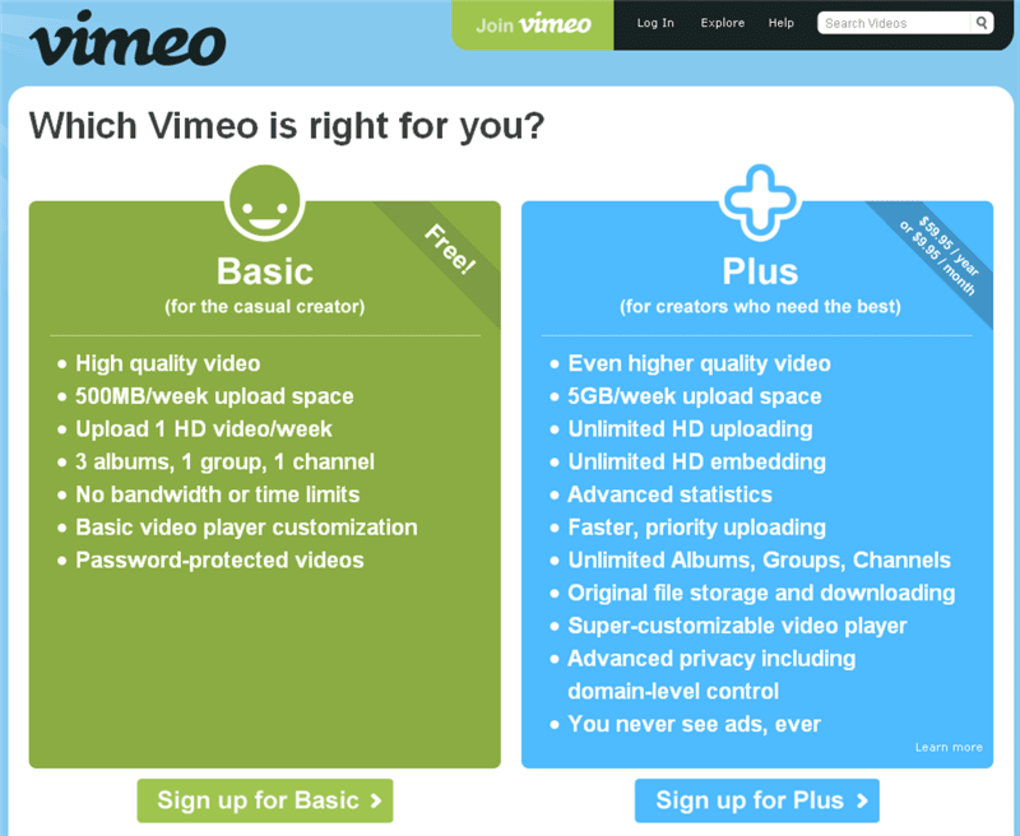
Moreover, Vimeo’s help centre offers video tutorials, searchable articles, and a responsive support team that assists with everything from upload troubleshooting to account management. For professionals, Vimeo offers a suite of paid plans—Plus, Pro, Business, and Premium—that unlock higher storage caps, advanced collaboration tools, and priority support. Even the free tier provides enough functionality for casual users to experiment with high‑quality uploads without worrying about intrusive ads.
All these features combine to create a video‑sharing ecosystem that feels both premium and approachable.
Installation, Usage & Compatibility
Getting Started on Desktop and Mobile
Vimeo does not require a traditional installation for its core service; you can access it directly through any modern web browser on Windows, macOS, Linux, or ChromeOS. For users who prefer a dedicated app, Vimeo offers native applications for Android and iOS, available via Google Play and the Apple App Store. The mobile apps mirror the desktop experience, providing seamless upload, playback, and community interaction on the go.
To begin, create a free account by entering an email address, choosing a username, and confirming your profile. Once logged in, click the “Upload” button, drag your video file into the browser window, and configure privacy settings before publishing. The AJAX uploader automatically resumes interrupted uploads, ensuring large files finish without needing to start over.
System Requirements
The web version works on any operating system that supports HTML5 and a recent browser (Chrome 80+, Firefox 78+, Safari 13+, Edge 85+). The Android app requires Android 6.0 (Marshmallow) or later, while the iOS app needs iOS 13 or newer. Minimum hardware specifications include a dual‑core processor, 2 GB RAM, and a stable internet connection of at least 5 Mbps for HD uploads. For creators aiming to stream 4K content, a faster connection (25 Mbps upload) and a modern GPU are recommended to avoid buffering during the processing stage.
Step‑by‑Step Workflow
- Sign Up / Log In: Register with an email or use Google/Facebook authentication.
- Upload Video: Click “New Upload,” select a file (up to 5 GB), and watch the progress bar.
- Set Privacy: Choose Public, Unlisted, Password‑Protected, or Private (domain‑restricted).
- Customize Embed: Adjust player color, autoplay, and loop options; copy the embed code.
- Publish & Share: Add title, description, tags, and select a thumbnail. Click “Publish.”
- Engage: Respond to comments, follow other creators, and add your video to collections.
- Analyze: Review playback stats in the Analytics dashboard to gauge audience reach.
All these steps are designed to be intuitive, allowing creators of any skill level to get their content online quickly and securely.
Pros, Cons & Frequently Asked Questions
Pros
- High‑quality video playback with minimal compression.
- Ad‑free viewing experience enhances audience focus.
- Robust privacy controls protect sensitive content.
- Community‑first comment system reduces toxicity.
- Custom URLs improve SEO and brand consistency.
- Advanced analytics provide actionable insights.
- Seamless integration with creative workflows (Adobe, Final Cut).
Cons
- Free tier limits storage to 500 MB per week.
- Upload size cap (5 GB) may be restrictive for feature‑length 8K projects.
- Premium plans can be pricey for small creators.
- Search discoverability is lower compared to YouTube’s algorithm.
- No live‑streaming on the free plan.
FAQ – Your Vimeo Questions Answered
Can I upload videos larger than 5 GB on Vimeo?
The standard upload limit for all users is 5 GB per file. Users on the Pro, Business, or Premium plans can increase this limit to up to 20 GB per upload, depending on the plan.
Is Vimeo completely ad‑free?
Yes. Vimeo does not serve pre‑roll, mid‑roll, or banner ads on any videos, providing an uninterrupted viewing experience for both creators and audiences.
How does Vimeo protect my video privacy?
You can set videos to Public, Unlisted, Password‑Protected, or Private (restricted to specific domains). Additionally, you can hide activity on your profile and control who can comment.
Can I embed Vimeo videos on my own website?
Absolutely. Vimeo provides customizable embed codes with options for player color, autoplay, loop, and more. Paid plans unlock higher‑resolution embeds (HD/4K).
What analytics does Vimeo offer?
Vimeo’s analytics dashboard shows total plays, unique viewers, geographic locations, traffic sources, and engagement metrics such as watch time and drop‑off points. Advanced plans provide deeper insights like viewer device breakdown.
Conclusion – Should You Download Vimeo Today?
If you’re an artist, filmmaker, or any creator seeking a polished, ad‑free platform that respects your work and your audience, Vimeo stands out as a premier choice. Its robust privacy controls, high‑definition playback, and community‑centric comment system differentiate it from larger, algorithm‑driven rivals. While the free tier’s storage limits may require an upgrade for heavy users, the paid plans are transparent and scalable, ensuring you only pay for the features you truly need.
Whether you’re looking to host a portfolio, share a short film, or embed videos on a corporate site, Vimeo’s reliable performance and elegant design make it a worthwhile investment. Ready to elevate your video presence? Download Vimeo now and start sharing your creativity with a respectful, high‑quality audience.



.png)



